softcows.com Logo  
  Game tools forum | Sitemap |
GO
 
Home | What's New | Downloads | Purchase | Affiliate | Contact Us

Home
What's New
Downloads
Purchase
affiliate
Contact Us
Gear Software Download


softcows.com software pack


Quick Memory Editor


Quick Memory Editor 5.5 - Powerful game memory editor, search & edit game memory

Quick Memory Editor is a powerful game cheating tool that can modify game data in memory easily. With Quick Memory Editor, you can search for any value in your game and change or lock it to the value you want to.

Sample 1: Use Quick Memory Editor with Insaniquarium Deluxe game / flash demo
Sample 2: Use Quick Memory Editor to recover Outlook Express account password
Sample 3: Use Quick Memory Editor to lock HP in arcade game Warriors of Fate (advanced)
Sample 4: Use Quick Memory Editor to edit lifetime reward points in The Sim 3 game

Download Now | Order Now


Quick Memory Editor Sample 4

How to Edit Lifetime Reward Points in The Sim 3 Game?

The lifetime reward points in The Sim 3 game is showed as integer, but it's actually floating number in memory. So if you search the number by using the default data type, you can't get the memory address.

Here is the steps to edit lifetime reward points by Quick Memory Editor:

1: Start Quick Memory Editor, start The Sim 3 game, add new task in Quick Memory Editor and select "TS3.exe" program.

2: Enter your current reward points, select data type: Floating Number, and search.

Repeat it a couple of times until the search results can't be decreased. Double click the two addresses and lock the number to 999999999.
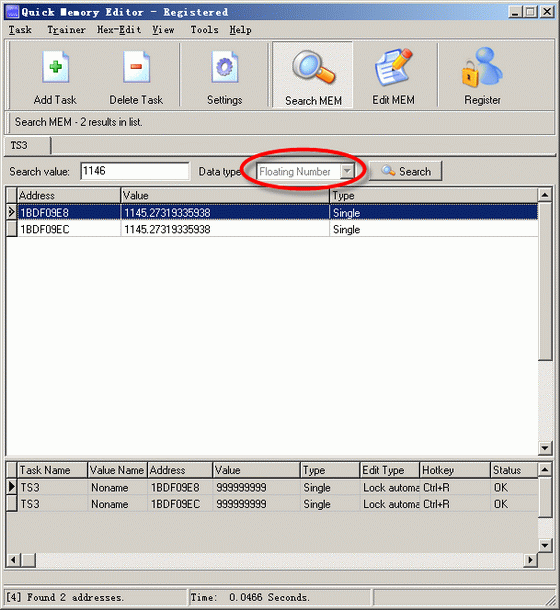
Searching floating number results

3: Back to the game. You can see your lifetime reward points is enough to buy all rewards now.

BTW: The money in this game is using integer, you can search it by using the default data type. As usual, I changed it to 999999999:)
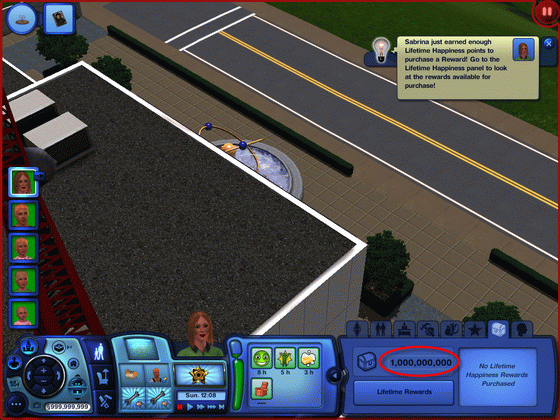
The Sim 3 Game

4: Enjoy cheating!

   
Copyright © 2001-2009 softcows dot com. All rights reserved.